How Publishers Use Existing Advertiser Banners for Rich Media Ads

Your advertisers already provide banners. Your ad operations team manages campaigns in Google Ad Manager. But what if you could offer more engaging advertising formats without hiring developers or building custom creatives for every campaign?
That is what Genecy is designed to help you do.
Genecy provides ready-to-use rich media creative templates for Google Ad Manager (GAM). Publishers, media companies, advertising networks, and ad operations teams can use these templates to expand their direct-sold advertising offerings with formats such as interstitials, website skins, parallax ads, sticky banners, and interactive creatives.
Genecy does not sell advertising, provide ad demand, or take a share of your advertising revenue. We provide the technology, while you manage your advertisers, campaigns, inventory, and pricing.
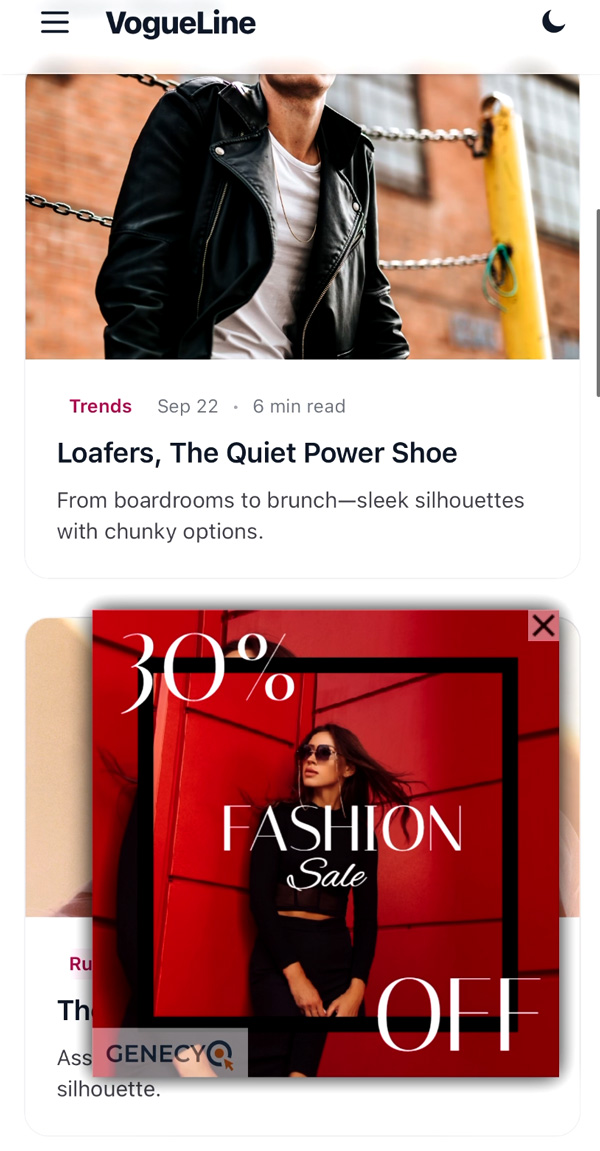
Here is how a standard advertiser banner can become a sliding rich media placement using Genecy’s Slider template:
You don’t need to create your advertisers’ banners
One common misconception about rich media advertising is that every campaign requires a designer or developer to build a completely new HTML5 creative.
In many cases, that is unnecessary.
Imagine that an advertiser sends your team a standard 300×250 image banner. Normally, you would upload it to Google Ad Manager and display it within a regular ad placement.
With Genecy, you can use that same image in a different advertising format. For example, you could:
- Display it as a floating banner that stays visible while the visitor scrolls.
- Make it slide into view from the side of the browser.
- Present it as an expandable advertising unit.
- Include it in an interstitial experience.
- Use suitable creative assets for a parallax or website takeover campaign.
The advertiser still provides the banner, landing page, and any required campaign materials. Genecy provides the reusable code that controls how the ad behaves on your website.
You don’t have to become a creative agency to offer rich media advertising. You can continue doing what your publishing business already does: selling advertising placements, receiving creatives, and delivering campaigns.
What exactly does Genecy offer?
Genecy is a library of ready-to-use custom creative templates for Google Ad Manager.
Each template defines the behavior of a particular advertising format. Instead of developing new JavaScript and CSS for each campaign, your ad operations team installs the template in Google Ad Manager and configures individual creatives using familiar form fields.
Our library includes multiple categories of advertising formats.
1. High-impact and website takeover ads
Wallpaper transforms the area around your website into an advertising experience, often called a website skin.
Interstitial ads provide a full-screen creative experience, while Welcomer creates a pushdown placement at the top of the website.
These formats can be offered as premium direct-sold placements for product launches, sponsorships, and branding campaigns.
2. Parallax and scroll-based advertising
Parallaxer creates a scrolling experience where the advertisement appears fixed behind a moving section of the page.
This type of placement is often called an interscroller or parallax ad. It is particularly useful for publishers with article-based content who want additional rich media opportunities within the reading experience.
3. Sticky, floating, and sliding ads
Floating and sticky advertising formats keep a creative in a defined position while visitors navigate or scroll through a website.
Genecy offers templates such as Floater, Slider, Catfisher, and Masthead to support different placement behaviors.
For example, a publisher can use the Slider format to present an advertiser’s existing banner as an animated unit entering from the side of the screen.
4. Interactive rich media ads
Some advertisers want visitors to interact with their campaigns instead of only viewing or clicking a static banner.
Genecy offers interactive templates including Cube, Carousel, Tilter, Revealer, and Selector. These formats support experiences such as rotating images, 3D interactions, scratch-to-reveal effects, and interactive product galleries.
Explore the full collection of rich media ad examples to see which formats suit your website and advertisers. For the broader publisher workflow, see rich media advertising for publishers.
How does Genecy work with Google Ad Manager?
Genecy templates are designed to fit into an existing Google Ad Manager workflow. You don’t need to replace your ad server, transfer your inventory, or manage campaigns through a separate advertising platform.
The basic process has three steps.
Step 1: Install the creative template
Download a Genecy template and import it into the creative template section of your Google Ad Manager network. Once installed, the template can be reused for future campaigns.
Step 2: Create an advertiser creative
When an advertiser books a campaign, create a new creative using the installed template. Depending on the selected format, you can configure options such as:
- Image, HTML5, or supported video assets.
- Click-through destination URL.
- Creative dimensions and positioning.
- Animation and display behavior.
- Impression tracking and other supported settings.
Most standard configurations do not require writing HTML, CSS, or JavaScript.
Step 3: Preview and deliver your campaign
Attach the creative to the appropriate line item, preview how it behaves on your website, and verify that the placement and tracking work as expected. Once tested, deliver the campaign through Google Ad Manager using your existing workflow.
One installed template can be reused across many campaigns, advertisers, and creatives.
For more information, read our guide to custom creative templates in Google Ad Manager.
How can rich media ads help publishers generate revenue?
For publishers with direct advertising sales, rich media formats create opportunities to offer more than standard display banners.
For example, imagine that your current media kit includes a regular 300×250 banner placement. With additional formats, you could also offer:
- A sticky banner package.
- A homepage wallpaper sponsorship.
- A parallax advertisement inside an article.
- A full-screen interstitial campaign.
- An interactive product showcase.
These are different advertising products that you can present to advertisers and agencies, potentially with different pricing structures.
The important point is that you decide what to sell and how much to charge.
Genecy does not determine your CPM, negotiate with advertisers, or participate in your advertising revenue.
Adding rich media formats does not automatically increase your RPM or fill rate. Results depend on advertiser demand, the quality of your inventory, your pricing strategy, and campaign performance.
However, if your advertisers are interested in premium placements, having ready-to-use formats can make it easier to create new direct-sales opportunities without paying for custom development every time.
How does the Genecy business model work?
Genecy operates as a software licensing business, not as an advertising network.
You purchase access to individual creative templates or a library plan, depending on your needs. With a library plan, you receive access to the premium creative templates along with updates and technical support according to your subscription.
You can continue using your downloaded templates after cancelling your subscription, under the perpetual-use license terms. An active plan is required for ongoing updates and support.
There are no Genecy charges based on the number of impressions, line items, or advertising campaigns you deliver.
And importantly, 100% of the revenue you earn from your advertisers remains yours. Genecy does not take a commission.
You can compare the available Genecy pricing and licensing plans to find the option that fits your publishing business.
What if my advertisers already provide HTML5 creatives?
That is perfectly fine.
Genecy is not intended to replace the creative work done by advertising agencies or in-house design teams.
If your advertiser delivers an HTML5 banner, you can continue using it as part of your existing Google Ad Manager workflow. For compatible formats, Genecy can also provide additional placement behavior around an existing HTML5 creative.
For example, a banner may already include its own animation and interactive elements. A Genecy template can control where and how that creative appears on the publisher’s website.
This separates two responsibilities:
The advertiser or agency creates the campaign assets. The publisher controls the advertising placement and delivery.
Genecy helps publishers manage that second part. Not every creative is compatible with every template, so it is important to test the finished combination before launching a campaign.
Who is Genecy designed for?
Genecy is particularly useful for:
- Independent publishers who want to expand their direct-sold advertising formats without maintaining custom ad scripts.
- Media companies and publishing groups managing advertising inventory across multiple websites.
- Ad operations teams that want reusable formats and consistent campaign setup in Google Ad Manager.
- Advertising networks and agencies that manage rich media campaigns for multiple publishers, subject to the applicable licensing terms.
You don’t need an in-house rich media development team. The templates handle the format behavior, while your existing team remains responsible for preparing, testing, and delivering the campaign.
Can I try Genecy for free?
Yes. Genecy offers two free Google Ad Manager creative templates: Iframer and Clipbanner.
These templates let you explore the installation process and become familiar with how custom creative templates work in Google Ad Manager before purchasing premium formats.
You can also browse live Google Ad Manager template previews to see how different formats behave on a website.
Frequently asked questions
Is Genecy an advertising network?
No. Genecy is a creative template provider for Google Ad Manager. We don’t provide advertiser demand, sell traffic, manage your inventory, or guarantee advertising revenue.
Do I need to create custom HTML5 ads for every campaign?
No. Many Genecy formats can use existing image or HTML5 assets supplied by your advertisers. The template already contains the code responsible for the advertising format’s behavior.
Can I use Genecy templates for multiple advertisers?
Yes. Once a template is installed, you can create new creatives for different advertisers and campaigns without installing a new copy for every line item.
Does Genecy charge per impression or campaign?
No. Genecy uses software licensing rather than impression-based pricing. Your advertising revenue stays with your business.
Will Genecy increase my advertising RPM?
Genecy does not guarantee an RPM increase. It helps you offer additional rich media products that may support higher-priced direct campaigns, depending on advertiser demand and your sales strategy.
Do Genecy templates work on mobile devices?
Many templates support desktop, tablet, and mobile environments. Some formats, particularly website skins and side placements, are better suited to desktop layouts. Check each template’s supported devices and preview its behavior before launching.
Do I need to change my current Google Ad Manager setup?
You do not need to replace Google Ad Manager. Genecy templates are installed within GAM and used when creating creatives for your existing campaigns. Depending on the format, website placement or configuration changes may be needed.
Start offering rich media ads with Genecy
Whether you manage one publication or a network of websites, Genecy helps you expand your advertising offering without developing every new format from scratch.
Keep your current advertisers, creative assets, Google Ad Manager setup, and campaign sales process. Add reusable rich media formats whenever your direct advertisers need more than a standard banner.
Explore all Google Ad Manager creative templates · See live rich media examples · Compare licensing plans