How to Share Google Ad Manager Campaign Reports With Advertisers
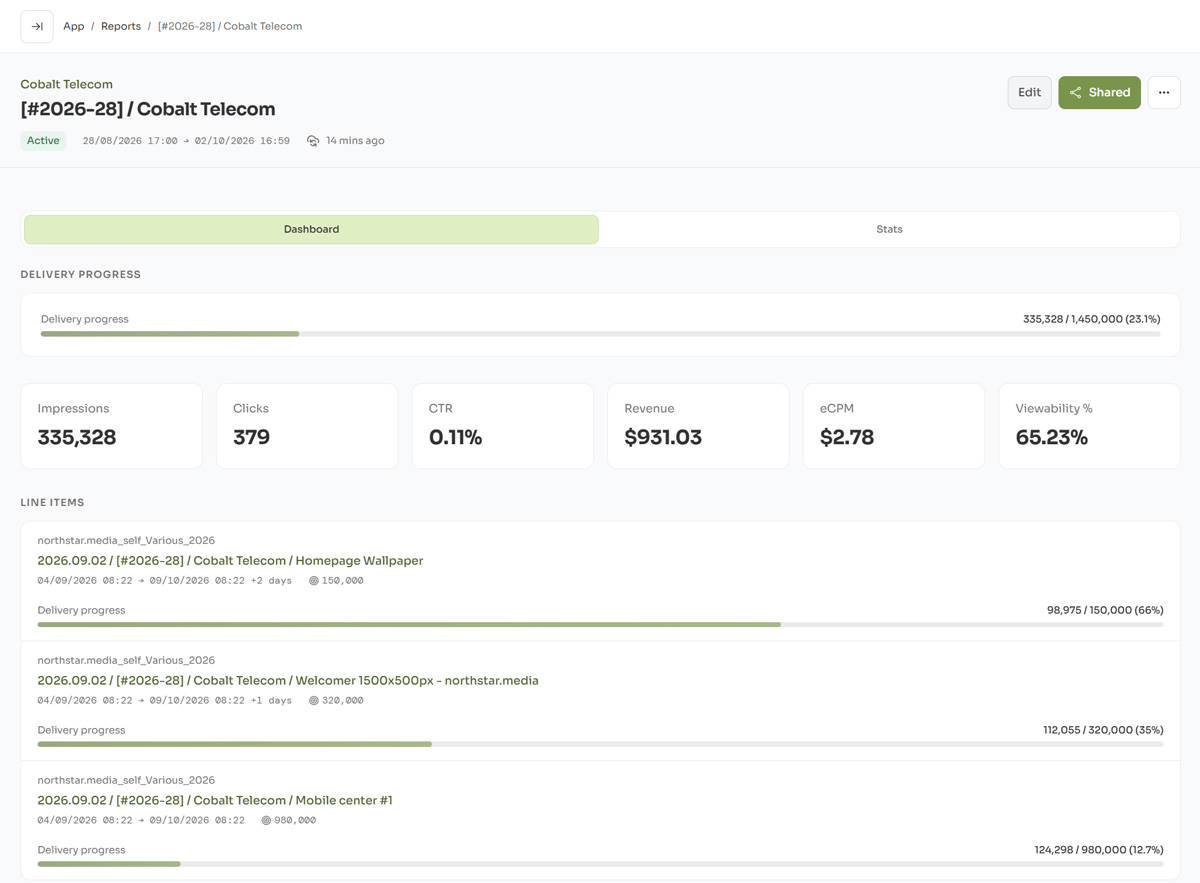
When you run direct campaigns in Google Ad Manager, advertisers often want to see how their campaigns are performing.
Google Ad Manager provides detailed reporting for publishers and Ad Ops teams, but sharing those results with an advertiser is a different problem. Giving a client access to your GAM network is usually unnecessary, while manually exporting and sending spreadsheets takes time and quickly becomes repetitive.
It also becomes more complicated when one advertiser campaign is represented by several line items in GAM.
This guide looks at practical ways to share Google Ad Manager campaign results with advertisers and agencies.
The usual Google Ad Manager reporting workflow
For a direct campaign, reporting often looks something like this:
- Run a report in Google Ad Manager.
- Select the required line items and metrics.
- Export the results to Excel or CSV.
- Remove information that should remain internal.
- Format the spreadsheet for the advertiser.
- Send it by email.
- Repeat the process when updated numbers are requested.
This works well for occasional reports.
The problem appears when you manage many direct campaigns or when advertisers expect regular updates during the campaign.
A spreadsheet sent on Monday also represents only the data available when it was generated. If the advertiser wants current numbers on Thursday, another report has to be prepared.
One advertiser campaign may have multiple GAM line items
There is another common complication: one campaign does not always equal one Google Ad Manager line item.
For example, an advertiser may buy a campaign that runs for a month but has a gap in the middle of the campaign period. Ad Ops may need to create separate line items for the different flight periods.
Multiple line items may also be used when a campaign has different targeting, delivery settings or other trafficking requirements.
Internally, this makes sense. GAM line items represent how the campaign is configured and delivered.
But the advertiser usually sees all of this as one campaign.
A client report should therefore not necessarily follow the internal GAM structure. It can combine several related line items into one campaign report.
Instead of sending separate results for:
- Campaign - Flight 1
- Campaign - Flight 2
- Campaign - Flight 3
the advertiser can follow one report covering the complete campaign.
As each line item starts and finishes, its statistics remain part of the same report. The client continues using the same URL throughout the campaign.
This also makes the final campaign totals easier to understand because impressions, clicks and other selected metrics from all included line items are combined into one report.
What should an advertiser campaign report include?
Advertisers normally do not need everything available inside Google Ad Manager.
For a standard display campaign, a simple client report may include:
- campaign or report name
- reporting period
- impressions
- clicks
- CTR
- daily performance
- creative performance
- campaign status
Depending on the campaign and commercial agreement, you may also want to include metrics such as viewability, revenue or eCPM.
The important part is separating client reporting from internal Ad Ops reporting.
Google Ad Manager contains information useful for operating the campaign that may not be useful or appropriate for the advertiser. A client-facing report should therefore be focused on the metrics that help the advertiser understand campaign delivery and performance.
Option 1: Export reports from Google Ad Manager
The simplest approach is to continue using GAM reports and export the results when an advertiser needs them.
This has some advantages. You remain completely inside the existing Google Ad Manager workflow, and there is no additional reporting system to maintain.
For publishers running only a few direct campaigns, this may be all that is required.
Manual exports become less practical when you have many campaigns, need to provide weekly updates, or regularly receive messages such as:
Can you send us the latest campaign numbers?
In these cases, much of the work is not actually campaign analysis. It is repeatedly retrieving and distributing the same data.
The process also becomes more involved when a sold campaign uses multiple GAM line items, because the results need to be selected and combined correctly for each update.
Option 2: Give another user access to Google Ad Manager
Google Ad Manager supports users, roles and permissions, so another person can be given access to reporting functionality.
This can work for people who are part of the publisher's own organization.
It is usually less attractive for advertisers.
Creating GAM users for external clients adds account and permission management, and the advertiser is entering a system designed primarily for publishers and Ad Ops teams rather than viewing a simple campaign report.
For most direct campaigns, an advertiser only needs to see the results of their campaign.
They do not need access to the ad server itself.
Option 3: Give the advertiser a dedicated live report
Another approach is to create a separate client-facing report connected to Google Ad Manager.
Instead of repeatedly sending updated spreadsheets, the publisher shares one report URL with the advertiser.
This is the approach we use with Gamlytics, a Google Ad Manager reporting tool built by the Genecy team.
Gamlytics connects to the publisher's GAM network and creates reports from one or multiple selected line items. While a campaign is active, report data is refreshed automatically.
This means the report can represent the advertiser's complete campaign, even when the campaign is split across several line items inside GAM.
The advertiser receives a controlled URL and does not need either a Google Ad Manager or Gamlytics account.
This changes the workflow from:
GAM → select line items → export → combine data → spreadsheet → email → repeat
to:
GAM line items → one live campaign report → share once
The advertiser can return to the same report whenever they need updated campaign numbers.
Keep following the same report throughout the campaign
Combining line items becomes especially useful for campaigns with multiple flights.
Imagine a campaign running:
September 1–10 → pause → September 18–30
Ad Ops may use separate GAM line items for these periods.
From the advertiser's perspective, however, it is still one September campaign.
With a live report, both line items can belong to the same client report. Results from the first flight remain visible during the gap. When the second line item begins delivering, its new statistics are added to the same report.
There is no need to give the advertiser another URL or create another client-facing report simply because the internal GAM setup changed.
The same approach works when more than two line items are required.
This creates a useful separation:
Google Ad Manager line items describe how the campaign is trafficked.
The client report describes the campaign the advertiser purchased.
Keeping internal and advertiser reporting separate
A public report does not need to reproduce everything available to Ad Ops.
For example, Gamlytics can keep internal campaign information and Ad Ops insights inside the application while presenting a simpler report to the advertiser.
The client-facing report can show campaign totals, daily performance, creative results and selected metrics.
When several GAM line items represent one sold campaign, their results can be combined into the same report rather than exposing the internal trafficking structure as separate client reports.
What happens when the campaign ends?
Campaign close-out is another part of direct campaign reporting that is easy to automate.
A typical manual workflow requires someone to notice that the campaign has ended, run the final GAM report, combine the relevant line-item results, prepare the report and send it to the client.
With Gamlytics, the same report can remain live throughout the campaign and then be closed after the campaign period ends.
After the final data is synchronized, Gamlytics can prepare the campaign close-out, generate AI summaries and send completion emails to the selected client contacts.
The advertiser receives the final report and can also download the report data as an Excel file.
This gives Ad Ops a consistent close-out process without requiring someone to manually prepare every final campaign email.
Live reporting does not replace Google Ad Manager
A client reporting tool should not try to replace GAM reporting.
Google Ad Manager remains the source of the campaign data and provides much deeper reporting capabilities for publishers and Ad Ops teams.
The difference is the audience.
GAM reporting is primarily an internal Ad Ops tool.
Client reporting is about presenting selected campaign results to advertisers in a simple and accessible way.
Keeping those two jobs separate can make the reporting workflow considerably easier.
When does automated client reporting make sense?
Manual GAM exports are perfectly reasonable if you manage a small number of direct campaigns and advertisers only need a final report.
A dedicated reporting workflow becomes more useful when:
- one advertiser campaign consists of multiple GAM line items
- campaigns have separate flights or gaps in their delivery periods
- advertisers request campaign updates during delivery
- Ad Ops prepares many similar reports every week
- sales teams regularly ask Ad Ops for current campaign numbers
- external clients should not have GAM access
- final campaign reports need to be sent consistently
- you want advertisers to see current results without requesting another export
The time saved on one report may be small. The benefit becomes much more noticeable when the same workflow is repeated across many campaigns and clients.
Try client reporting with your own GAM campaigns
We built Gamlytics as a separate tool for publishers and Ad Ops teams using Google Ad Manager for direct campaigns.
You can combine one or multiple GAM line items into a single client report, keep its statistics updated while the campaign runs, share it without giving the advertiser GAM access, and automate campaign close-out.
This allows your internal GAM setup to remain as complex as necessary while giving the advertiser one simple report for the campaign they purchased.
You can start with a 14-day free trial without a credit card.
For a closer look at the sharing workflow, see how to share Google Ad Manager reports without giving clients GAM access.
Filed in GAM Guides, Tools & Utilities