
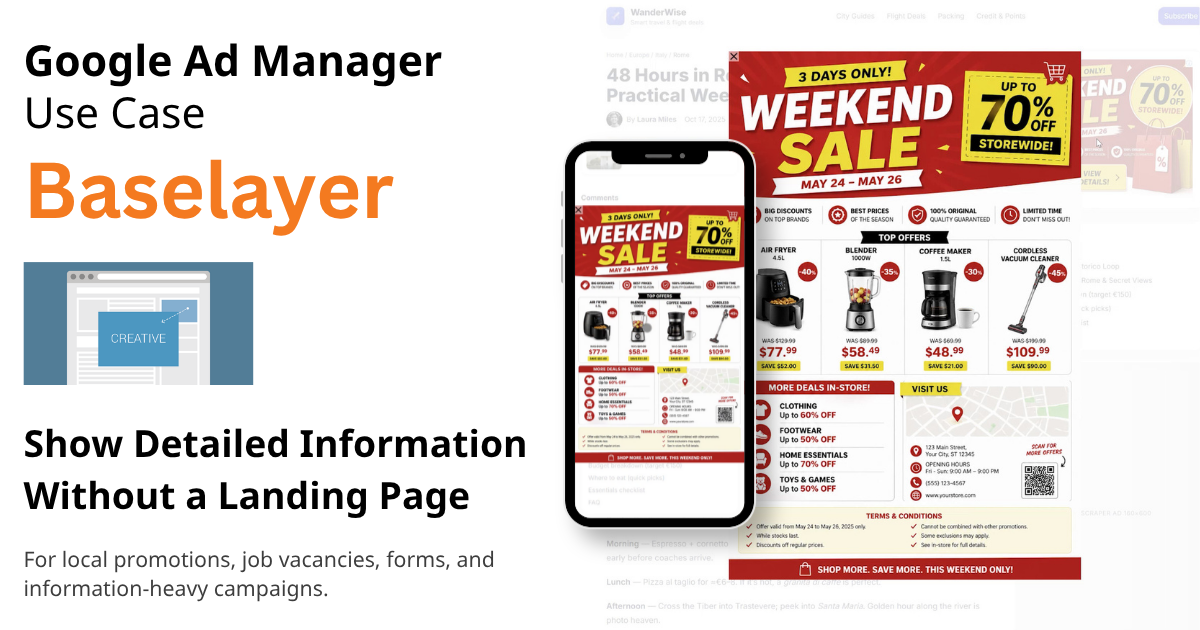
Some advertisers need to show more information than a standard banner allows, but they do not have a landing page or an easy way to update their website.
A common example is a local store promoting large weekend discounts. They want to show detailed information about offers, prices, and conditions directly in the ad.
Solution
For this case, creative template Baselayer for Google Ad Manager is a practical solution.
It uses two creatives:
- a base creative shown in a standard ad unit (for example, 300×250)
- a popup layer that appears after user interaction
The base creative attracts attention, while the popup layer shows all detailed information without redirecting the user to another website.
For example, the popup layer can display a large image converted from a PDF prepared for print media.
No new ad units required and fast setup inside existing GAM inventory.
Setup
- Use one of your current ad units, for example, 300×250
- Prepare two creatives:
- base creative with the appropriate banner size
- layer creative with all detailed information
- No landing page required
- No click-through URLs needed
Other Use Cases
- job vacancy campaigns
base creative: “We Are Hiring”
popup layer: full job description - government or public information
base creative: short message
popup layer: full announcement - forms and lead collection
base creative: basic offer and CTA
popup layer: subscription form, poll, or application form
Result
Mobile preview:
Desktop preview:
Minimal requirements and quick setup make Baselayer a practical format for campaigns where the goal is information delivery instead of website traffic.